(Synology Chat 웹훅 + 종목별 트레일링% 설정 + 일일 요약 포함)
주식을 하다 보면 이런 생각이 듭니다.
“최고 수익에서 10%만 빠지면 정리하고 싶은데…
내가 계속 보고 있을 수는 없잖아?”
그래서 오렌지파이5에 상시 감시용 트레일링 알림 시스템을 만들었습니다.
✔ 일반주식 + ETF 모두 가능
✔ 종목별로 트레일링 % 다르게 설정
✔ 장중에만 매도 알림
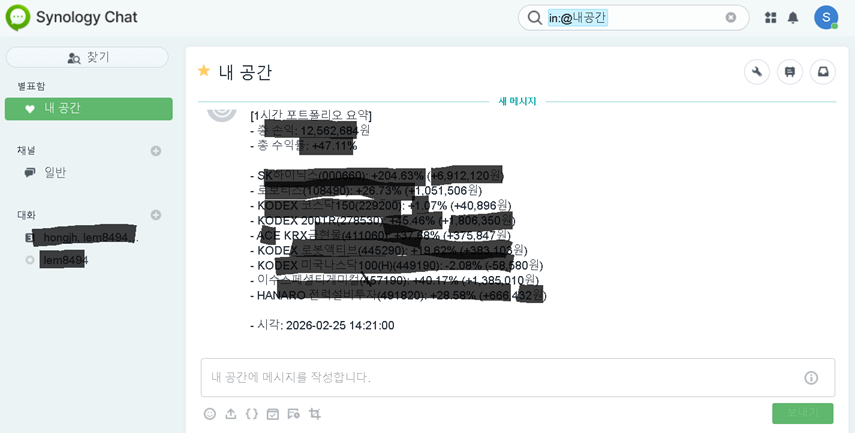
✔ 장마감 후 하루 1번 요약
✔ 매도 알림 발생 시 자동 감시 해제
이 글에서는 실제 운영 가능한 코드 구조를 정리합니다.
🧠 시스템 구조
positions.csv   → 보유 종목 관리
config.json     → 시스템 설정
state.json      → 종목별 최고 수익(peak) 저장
main.py         → 전체 로직 실행
📊 핵심 로직 (트레일링 스탑)
1️⃣ 기본 계산
entry_value   = 매수수량 × 매수가
current_value = 매수수량 × 현재가
peak_value    = max(기존 peak_value, current_value)
2️⃣ 트레일링 기준선
stop_value = peak_value × (1 - trailing_pct)
3️⃣ 매도 알림 조건
수익 구간에서만 적용
current_value <= stop_value 이면 알림
✔ 계속 오르면 peak가 올라감
✔ 기준선도 같이 올라감
✔ 최고점 대비 n% 하락 시 알림
🗂 1️⃣ 보유 종목 파일 (positions.csv)
code,name,market,qty,buy_price,trailing_pct,active
005930,삼성전자,KS,10,70000,0.10,1
069500,KODEX 200,KS,20,35000,0.08,1
035420,NAVER,KS,3,200000,0.12,1
| 컬럼 | 설명 |
|---|---|
| code | 6자리 종목코드 |
| market | KS(코스피/ETF), KQ(코스닥) |
| qty | 수량 |
| buy_price | 매수가 |
| trailing_pct | 종목별 트레일링 비율 |
| active | 1=감시, 0=감시중지 |
✔ 매도 알림 발생 시 active=0 자동 변경
⚙ 2️⃣ 설정 파일 (config.json)
{
  "interval_minutes": 30,
  "default_trailing_pct": 0.10,
  "synology_chat_webhook_url": "웹훅URL",  "market_open": "09:00",
  "market_close": "15:30",  "daily_summary_time": "15:35",  "auto_disable_on_alert": true
}
🖥 3️⃣ 오렌지파이5 설치
python3 -m pip install --upgrade pip
python3 -m pip install yfinance requests
✔ ARM 환경에서 가장 안정적
✔ FinanceDataReader 대신 yfinance 사용
🧾 4️⃣ 전체 실행 코드 (주석 상세 버전)
아래는 핵심 구조가 잘 보이도록 정리한 “설명형 소스”입니다.
"""
OrangePi5 트레일링 스탑 알림 시스템
- 주식 + ETF 지원
- 종목별 trailing_pct 적용
- 장중만 매도 알림
- 하루 1회 요약
- 매도 발생 시 active=0 자동 변경
"""import os
import json
import time
import csv
from datetime import datetime, timedelta, time as dtime
import requests
import yfinance as yf# -------------------------
# 기본 경로 설정
# -------------------------
BASE = os.path.dirname(os.path.abspath(__file__))
CONFIG_PATH = os.path.join(BASE, "config.json")
POSITIONS_PATH = os.path.join(BASE, "positions.csv")
STATE_PATH = os.path.join(BASE, "state.json")# -------------------------
# 유틸 함수
# -------------------------
def log(msg):
    print(f"[{datetime.now()}] {msg}")def fmt(x):
    return f"{x:,.0f}"def parse_hhmm(s):
    h, m = s.split(":")
    return dtime(int(h), int(m))# -------------------------
# Synology Chat 알림
# -------------------------
def send_chat(url, text):
    payload = json.dumps({"text": text}, ensure_ascii=False)
    requests.post(url, data={"payload": payload})# -------------------------
# 가격 조회 (yfinance)
# -------------------------
def get_price(code, market):
    ticker = f"{code}.{market}"
    hist = yf.Ticker(ticker).history(period="7d")
    return float(hist["Close"].iloc[-1])# -------------------------
# 메인 실행
# -------------------------
def main():
    config = json.load(open(CONFIG_PATH))
    state = json.load(open(STATE_PATH)) if os.path.exists(STATE_PATH) else {}    open_t = parse_hhmm(config["market_open"])
    close_t = parse_hhmm(config["market_close"])
    summary_t = parse_hhmm(config["daily_summary_time"])    while True:
        now = datetime.now()        # positions 읽기
        positions = list(csv.DictReader(open(POSITIONS_PATH, encoding="utf-8-sig")))
        positions = [p for p in positions if p.get("active","1") == "1"]        total_entry = total_current = total_peak = 0
        rows = []        for p in positions:
            code = p["code"]
            market = p.get("market","KS")
            qty = float(p["qty"])
            buy = float(p["buy_price"])
            trailing = float(p.get("trailing_pct") or config["default_trailing_pct"])            price = get_price(code, market)            entry = qty * buy
            current = qty * price            peak = state.get(code, {}).get("peak", entry)
            peak = max(peak, current)            state.setdefault(code, {})["peak"] = peak            # 트레일링 조건
            if open_t <= now.time() <= close_t:
                stop = peak * (1 - trailing)
                if current <= stop:
                    send_chat(config["synology_chat_webhook_url"],
                              f"[매도 알림] {p['name']} 최고대비 {int(trailing*100)}% 하락")
                    if config["auto_disable_on_alert"]:
                        p["active"] = "0"            total_entry += entry
            total_current += current
            total_peak += peak            rows.append((p["name"], (current-entry)/entry*100))        # 하루 1회 요약
        if now.time() >= summary_t:
            if state.get("summary_date") != now.strftime("%Y-%m-%d"):
                profit = total_current - total_entry
                send_chat(config["synology_chat_webhook_url"],
                          f"[일일 요약] 총 손익 {fmt(profit)}원")
                state["summary_date"] = now.strftime("%Y-%m-%d")        json.dump(state, open(STATE_PATH,"w"), indent=2)        log("루프 완료. 다음 실행 대기...")
        time.sleep(config["interval_minutes"]*60)if __name__ == "__main__":
    main()
📈 실행 중 로그 예시
[2026-02-25 10:00] 가격 조회 시작
[2026-02-25 10:00] 삼성전자 peak 갱신
[2026-02-25 10:00] 트레일링 체크 완료
[2026-02-25 10:00] 루프 완료. 다음 실행 대기...
📌 운영하면서 느낀 점
- 지연 시세 기반이라 실시간 체결가 기반은 아님
- 그러나 구조 테스트 및 자동 감시 시스템에는 충분
- 실시간으로 확장하려면 가격 조회 부분만 API로 교체하면 됨
🚀 다음 확장 방향
- 증권사 API 연동
- 텔레그램/카카오톡 알림 추가
- Streamlit 대시보드 추가
- 매수 전략 자동화
🧩 결론
이 시스템은
✔ 오렌지파이5 같은 저전력 장비에 적합
✔ 구조가 단순해서 유지보수 쉬움
✔ 나중에 실시간 API로 확장 가능
입니다.
이 글이 도움이 되었나요?좋아요/추천은 다시 누르면 취소됩니다.